

Key takeaways
- Choose the Mac mini M4 for the quietest polished setup and commit to your memory capacity at purchase.
- Choose the Beelink SER8 for a capable, upgradeable Windows desktop that balances size and acoustics.
- Choose the Minisforum UM790 Pro for two-drive expansion, 2.5Gb networking, and stronger enthusiast performance.
- Choose a ThinkCentre M75q Tiny or OptiPlex Micro when serviceability, mounting, and business support matter more than maximum graphics performance.
- Choose an ASUS NUC 14 Pro when the smallest mainstream Intel design and Thunderbolt connectivity are priorities.
The best small form factor PCs for most compact home setups are the Apple Mac mini with M4 for quiet everyday work, the Beelink SER8 for efficient Windows performance, and the Minisforum UM790 Pro when upgradeable memory, storage, and stronger integrated graphics matter most.
Our top picks


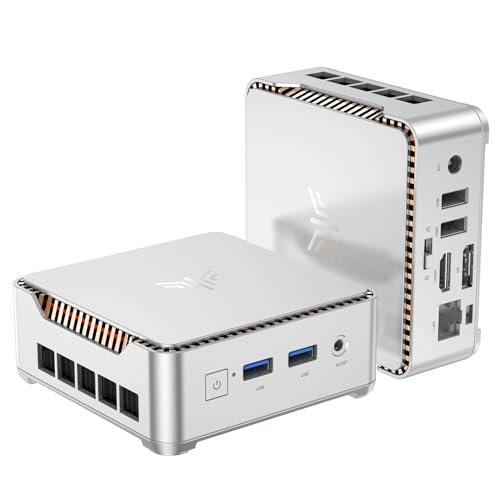

As an Amazon Associate we earn from qualifying purchases at no extra cost to you. Ratings are shown as listed on Amazon.
Quick picks by home setup
| Best for | Recommended type or model | Why it fits | Typical 2026 market range |
|---|---|---|---|
| Quiet desk, browsing, office work | Apple Mac mini with M4 | Very small, low noise, excellent efficiency, macOS | $599–$999 depending on memory and storage |
| Windows workstation with good integrated graphics | Beelink SER8 | Ryzen 7 8845HS, upgradeable RAM and SSD, quiet large-format cooling | $450–$700 |
| Maximum flexibility in a small chassis | Minisforum UM790 Pro | Ryzen 9 7940HS, two SODIMM slots, two M.2 slots, many displays | $500–$800 configured |
| Business reliability and easy service | Lenovo ThinkCentre M75q Tiny | Compact enterprise design, serviceable parts, VESA mounting options | $500–$1,000 depending on configuration |
| Smallest mainstream Intel option | ASUS NUC 14 Pro | About 0.7 litres in its slim configuration, Thunderbolt 4, Windows or Linux | $500–$1,100 depending on configuration |
What matters when choosing the best small form factor PCs
Small dimensions alone do not determine whether a computer is suitable for a home office, living-room media center, or creative workstation. Compare the processor’s sustained performance, cooling design, upgrade path, port placement, power supply, and mounting method as a group.
Size and placement
Most compact PCs occupy between 0.7 and 1.0 litres, while slightly larger models around 1.2 to 1.5 litres can cool more powerful processors with less fan noise. A chassis that is only a few centimetres wider may provide room for a second SSD, larger fans, or two memory modules.
Measure the intended shelf rather than relying on a product’s advertised footprint. Leave at least 5 cm of open space around the ventilation openings, and avoid placing a fan-cooled PC inside a closed media cabinet. For a monitor-mounted setup, check whether the included VESA bracket supports the monitor’s weight and whether the PC’s cables will interfere with the stand.
Processing performance
For documents, web applications, video calls, and streaming, modern four- to eight-core processors are already more than adequate. The difference appears during sustained work such as compiling software, exporting video, batch photo processing, or running virtual machines.
The Ryzen 7 8845HS in the Beelink SER8 and Ryzen 9 7940HS in the Minisforum UM790 Pro combine eight CPU cores with comparatively capable Radeon integrated graphics. They are suitable for light 1080p gaming and GPU-accelerated creative applications, although neither replaces a desktop with a dedicated graphics card for demanding modern games.
Apple’s M4 Mac mini is particularly strong for quiet general productivity and many creative workflows. Its limitation is not everyday speed but platform flexibility: memory is integrated and cannot be upgraded later, and some specialist Windows-only software may require alternatives or virtualization.
Head-to-head comparison
| PC | Approx. dimensions | Processor class | Memory and storage | Notable ports | Mounting and cooling |
|---|---|---|---|---|---|
| Apple Mac mini M4 | 12.7 × 12.7 × 5.0 cm | Apple M4, 10-core CPU | 16–32 GB unified memory; 256 GB–2 TB SSD, not user-upgradable | Thunderbolt 4, HDMI, USB-C, Ethernet, headphone output | Metal enclosure; optional underside mounting solutions; quiet active cooling |
| Beelink SER8 | 13.5 × 13.5 × 4.5 cm | AMD Ryzen 7 8845HS, 8 cores/16 threads | Usually 16–32 GB DDR5; 500 GB–1 TB M.2 SSD, upgradeable | USB4, HDMI, DisplayPort, USB-A, Ethernet, audio | Large internal fan and heat spreader; VESA bracket commonly included |
| Minisforum UM790 Pro | 13.0 × 12.6 × 5.2 cm | AMD Ryzen 9 7940HS, 8 cores/16 threads | Two DDR5 SODIMM slots; two M.2 2280 slots | USB4, HDMI, DisplayPort, USB-A, 2.5Gb Ethernet | Active cooling with a separate SSD cooling path; VESA mounting support |
| Lenovo ThinkCentre M75q Tiny | Approx. 18.3 × 17.9 × 3.7 cm | Low-power Ryzen PRO processor, configuration dependent | SODIMM memory and M.2 storage are generally serviceable | DisplayPort, USB-A, USB-C on selected configurations, Ethernet | Business-oriented airflow; Tiny-in-One and VESA accessories available |
| ASUS NUC 14 Pro slim | Approx. 11.7 × 11.2 × 3.7 cm | Intel Core Ultra mobile processor, configuration dependent | Two SODIMM slots and M.2 storage | Thunderbolt 4, HDMI, USB-A, Ethernet, wireless connectivity | Very compact active cooling; vertical and VESA mounting accessories vary |
Which one wins on practical ownership?
Apple Mac mini M4: best for quiet, polished simplicity
The Mac mini is an excellent choice when the computer will stay on a desk beside a monitor, television, or audio equipment. Its 12.7 cm square footprint is easy to accommodate, and macOS power management keeps ordinary workloads quiet and efficient. Thunderbolt 4 supports fast storage docks and displays, while HDMI handles a television directly.
The main compromise is upgradeability. Choose memory carefully at purchase because unified memory is not replaceable. External USB-C or Thunderbolt storage can expand capacity, but it adds a cable and another box. The base configuration is attractive for light use; a 24 GB or 32 GB model makes more sense for large creative projects and long-term ownership.
Beelink SER8: best balanced Windows option
The SER8 combines a relatively shallow chassis with a Ryzen 7 8845HS processor and a cooling system designed to avoid the high-pitched fan behavior common in ultra-thin mini PCs. Its two memory modules and replaceable M.2 SSD make it easier to extend the machine later than a Mac mini.
It is a strong home-office choice for people who want Windows, several displays, light gaming, and occasional demanding work. Check the exact configuration before buying: memory capacity, wireless standard, operating-system license, and included mounting hardware can vary by seller and region.
Minisforum UM790 Pro: best for enthusiasts and upgrades
The UM790 Pro is appealing when ports and internal expansion matter more than absolute silence. Two M.2 slots allow a fast system drive plus a second drive for projects or media, while two SODIMM slots permit a later memory upgrade. Its 2.5Gb Ethernet is useful for a compatible home network or network-attached storage.
That performance requires sensible placement. Keep the bottom intake clear, use the supplied cooling hardware for the SSD where applicable, and expect more fan activity under sustained loads than from a low-power office mini PC.
Business mini PCs: best for serviceability
The ThinkCentre M75q Tiny and similar Dell OptiPlex Micro systems are often less exciting on a specification sheet, but they offer mature firmware, business support channels, tool-less service features, and established mounting accessories. They are particularly practical behind a monitor or under a desk.
They may use lower-power processors and have fewer high-speed display or USB options than enthusiast mini PCs. For office software, remote work, and point-of-use computing, that trade-off can improve reliability and reduce unnecessary performance spending.
Cooling, noise, and maintenance realities
Mini PCs accumulate dust faster than many tower computers because their small fans move air through narrow openings. Inspect the intake every three to six months in a dusty room, and clean it with the computer powered off. Do not block the underside with a soft mat or place the unit directly on carpet.
The parts most likely to cause trouble over time are the cooling fan, the power adapter, and the SSD rather than the processor itself. A fan may become noisy after prolonged dust exposure; an external power brick can fail or develop a loose cable; and an SSD can slow down when nearly full or when subjected to continuous writes. Keep at least 15% of the system drive free and maintain a separate backup of important files.
A simple fit calculation before you buy
Suppose a shelf is 30 cm wide and 25 cm deep. A 13.5 cm square mini PC leaves 16.5 cm of width and 11.5 cm of depth after placing it flush against one corner. That sounds comfortable, but the rear cable bend and ventilation gap may consume 5–8 cm of the remaining depth. If the shelf is enclosed, choose a front-vented location or move the PC to the desktop instead.
For a monitor-mounted installation, add the computer’s height to the monitor’s rear clearance. A 4.5 cm-high PC may fit behind a display, but its power cable, HDMI plug, and Ethernet connector can require more space than the chassis itself. Measure the connector side, not just the bracket area.
Final buying advice
- Choose the Mac mini M4 for the quietest polished setup and commit to your memory capacity at purchase.
- Choose the Beelink SER8 for a capable, upgradeable Windows desktop that balances size and acoustics.
- Choose the Minisforum UM790 Pro for two-drive expansion, 2.5Gb networking, and stronger enthusiast performance.
- Choose a ThinkCentre M75q Tiny or OptiPlex Micro when serviceability, mounting, and business support matter more than maximum graphics performance.
- Choose an ASUS NUC 14 Pro when the smallest mainstream Intel design and Thunderbolt connectivity are priorities.
The best small form factor PCs are not simply the smallest models available. The right choice leaves enough ventilation for sustained performance, provides the ports your room actually needs, and offers an upgrade or replacement path that matches how long you plan to keep the setup.



Write Your Review
No reviews yet. Be the first to share your experience!