

Key takeaways
- Compare hardware RAID storage enclosures for creative studios, with on-board RAID controllers, bay counts and connection types checked against each listing.
A creative studio rarely loses time because a drive is slow. It loses time when a card reader full of footage, a project drive and a backup drive all live in different places, and one of them fails the week a client asks for revisions. A hardware RAID enclosure fixes the shape of that problem: several drives sit in one box, the box itself builds and guards the array, and your editing machine sees a single volume that keeps working when one disk drops out.

This guide is for photographers, video editors and small studio teams who want that protection without building a server or relying on software RAID inside the operating system. Every enclosure below was chosen because its own product listing describes an on-board hardware RAID controller, and the specifications quoted here come from those listings rather than from roundups or manufacturer summaries.
Quick Picks
As an Amazon Associate we earn from qualifying purchases.
| Product | Best for | Key spec from title |
|---|---|---|
| QNAP TR-004 | A four-bay mirrored or parity array beside the main editing desk | 4 Bay USB Type-C Direct Attached Storage (DAS) with hardware RAID |
| Mediasonic HFR7-SU31CD | An editor who also wants a hub, laptop charging and a second screen from the same box | Hardware embedded raid controller built-in on board with one-button control |
| QNAP TR-002-A-US | A compact two-drive mirror for a photographer who travels between studio and home | 2 Bay USB Type-C Direct Attached Storage (DAS) with Hardware RAID |
| Mediasonic HFR2-SU3S2 PRORAID | A studio that wants the widest RAID menu, including RAID 5 and RAID 10, on an older workstation | Hardware Raid controller built-in on board |
How to Choose
Confirm the RAID really lives in the box
Plenty of multi-bay enclosures are plain drive holders: they pass each disk through to the computer and leave any array building to software. That distinction decides whether the volume survives a move to a different machine. Look for listing language that names an on-board or hardware embedded RAID controller, or a product title that says hardware RAID outright, as the QNAP listings do. If the wording only promises RAID modes without saying where the array is managed, treat the claim as unproven and keep shopping, because a software array ties your footage to one operating system and one set of drivers.
Match the RAID menu to the failure you fear
Studios usually pick between three shapes of protection. RAID 1 mirrors two drives so one can fail with no interruption, which suits a two-bay box. RAID 5 spreads data plus parity across at least three drives and gives back more usable space, which suits a four-bay archive. RAID 10 mirrors pairs and stripes across them for speed with redundancy. Read the exact mode list on the listing before ordering: one four-bay enclosure below stops at RAID 0 and RAID 1, while another offers RAID 3, 5 and 10 as well, and that gap matters more than the bay count printed on the front.
Count bays against your next two years of projects
Drive bays fill faster than studios expect, because a sensible layout keeps the working project, its mirror or parity partner and tomorrow’s expansion in the same chassis. A two-bay mirror is tidy for a stills photographer whose delivered archive also lives elsewhere. A four-bay unit lets a video team run RAID 5 today and add capacity later without replacing the enclosure. Check which drive sizes the listing accepts, too: the models here take 3.5 inch SATA drives, and some also accept 2.5 inch SATA SSDs, which changes whether older laptop drives can be recycled into the array.
Check the connection your editing machine actually has
The enclosure can only move footage as fast as its link allows, and the listings state that link plainly. Newer boxes here use USB Type-C at USB 3.2 Gen 2 speed, while the older Mediasonic design pairs USB 3.0 with eSATA. A studio cutting from a current laptop wants the Type-C models; a studio with an established tower workstation may already have eSATA and gain nothing from paying for a newer port. Also note extras the listing confirms, such as a built-in USB hub or power delivery, because those can retire a separate dock from the desk.
The 4 Best Options
QNAP TR-004
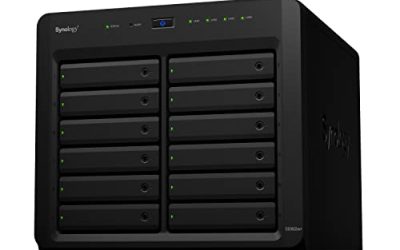
The TR-004 is the natural starting point for a studio that wants one protected volume next to the main editing machine. Its listing presents it as a four-bay direct attached storage unit with hardware RAID in the title itself, so the array is managed by the enclosure rather than by your editing software or operating system. Four bays leave room to run a parity layout now and still hold spare capacity for the next busy season, and the USB Type-C link suits current laptops and workstations alike. Because it is diskless, you choose the drives and can match them to the sizes your projects already use.
Specs
- 4 drive bays, diskless
- USB Type-C connection
- Hardware RAID, stated in the product title
- Listed as direct attached storage (DAS)
Best for: A small video or photo studio building its first parity or mirrored array on the main desk.
Watch out for: It connects over USB only, so there is no network port and no way for the whole studio to reach it as a shared server.
ASIN: B07K4RC7X9
Mediasonic HFR7-SU31CD
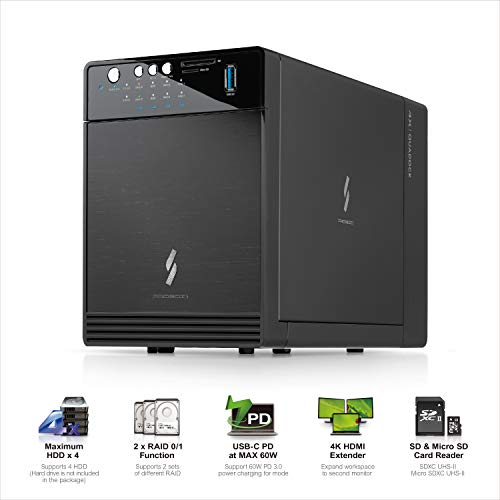
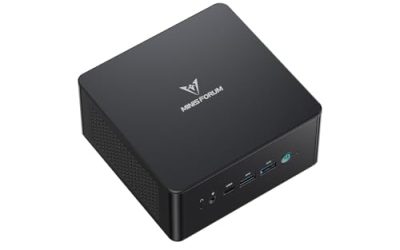
This Mediasonic box suits the editor whose desk is short on ports as much as it is short on protected storage. Its listing describes a hardware embedded RAID controller built in on board with one-button control, covering Single Drive Mode, RAID 0 and RAID 1. Around that controller the same listing adds a built-in USB hub, power delivery for a laptop over the USB-C cable, an HDMI extender for a second monitor and an SDXC reader, which speaks directly to a photographer’s ingest routine: card in, files onto a mirrored pair, laptop charging from the same unit. The trade is a shorter RAID menu than its four bays might suggest.
Specs
- Hardware embedded RAID controller built in on board, one-button control
- RAID modes listed: Single Drive Mode, RAID 0, RAID 1
- USB 3.2 Gen 2 10Gbps Type C connection
- 4 bays for 3.5 inch SATA drives, also accepts 2.5 inch SATA SSD and HDD
- Built-in USB hub with USB Type A and Type C connections
- 60W Power Delivery 3.0 for charging a laptop over USB-C
- 4K HDMI extender and SDXC card reader
- Supports UASP, S.M.A.R.T and Smart Fan
Best for: A solo editor or photographer who wants mirrored storage, ingest and docking in one desktop unit.
Watch out for: The RAID menu stops at RAID 0 and RAID 1, so four drives cannot be combined into a parity array.
ASIN: B085D9QPML
QNAP TR-002-A-US
The smaller QNAP answers a narrower brief: two drives, mirrored, in a box that can move between a studio desk and a home office without drama. Its listing title again carries the hardware RAID wording directly, describing a two-bay USB Type-C direct attached storage unit, diskless. For a stills photographer whose working set fits on one mirrored pair, that is often the whole requirement, and the enclosure-managed array means the volume mounts the same way on whichever machine it meets. It also works as a compact expansion companion for an existing QNAP setup, though as a plain DAS for a single computer it stands on its own.
Specs
- 2 drive bays, diskless
- USB Type-C connection
- Hardware RAID, stated in the product title
- Listed as direct attached storage (DAS)
Best for: A photographer who wants a simple mirrored pair that travels between two workspaces.
Watch out for: Two bays mean mirroring halves your usable space, and there is no RAID 5 option for growing into.
ASIN: B0BVCXFMDH
Mediasonic HFR2-SU3S2 PRORAID
The PRORAID is the veteran design in this group, and its listing earns its place by spelling out the hardware plainly: a hardware RAID controller built in on board, with the widest mode list here, running from Single Drive Mode through RAID 0, 1, 3, 5 and 10. That range lets a studio pick parity, mirroring or a striped mirror without changing boxes. The connections belong to an earlier generation, USB 3.0 and eSATA, which will bother nobody whose workstation already has those ports and whose archive work is sequential rather than rushed. Its Smart Fan and thermal sensor also get a specific mention in the listing.
Specs
- Hardware RAID controller built in on board
- RAID modes listed: Single Drive Mode, RAID 0, RAID 1, RAID 3, RAID 5, RAID 10
- 4 bays for 3.5 inch SATA I, II and III drives, up to 16TB per drive
- Transfer rates up to 5.0Gbps via USB 3.0 and up to 3.0Gbps via eSATA
- Smart Fan with thermal sensor built in
- Power Sync, switching off in synchronisation with the PC
Best for: A studio with an older workstation that wants RAID 5 or RAID 10 without upgrading its ports.
Watch out for: The interface generation is older, so the stated transfer ceilings sit below the USB Type-C models above.
ASIN: B003YFHEAC
Which One Fits Your Situation
You edit video full time and cannot lose a delivery week
Start with the QNAP TR-004. Four bays let you run a parity array that tolerates a failed drive while a project is still live, and the hardware RAID wording in its own listing means the enclosure, not your editing application, guards the volume. Order matched drives, build the array before the next shoot lands, and the box quietly removes the single-drive failure that ruins schedules.
You shoot stills and ingest cards at one crowded desk
The Mediasonic HFR7-SU31CD fits this desk best. Its SDXC reader speaks to a card-based workflow, the mirrored RAID 1 mode protects the ingest immediately, and the hub, laptop charging and HDMI extender described in its listing can replace a separate dock. Accept the shorter RAID menu as the price of that consolidation, and keep a second copy of delivered work elsewhere as usual.
You split the week between a studio and a home office
Take the QNAP TR-002-A-US. A two-bay mirrored unit is small enough to move, and because the array is managed in hardware, the same volume greets you on either machine without rebuilding anything in software. It suits a photographer whose active projects fit on one mirrored pair and whose finished archive already lives on separate storage at each end.
Your workstation is older but your archive keeps growing
The Mediasonic HFR2-SU3S2 PRORAID matches a tower that already offers USB 3.0 or eSATA. Its listing promises RAID 5 and RAID 10 alongside the simpler modes, so a growing archive can use parity instead of giving up half its space to mirroring. The slower stated transfer rates matter less for overnight copies and archive retrieval than they would for live editing.
Common Mistakes
- Buying a multi-bay enclosure whose listing never says the RAID is handled in hardware, then discovering the array depends on software on one computer.
- Choosing RAID 0 for working projects because it is fast, even though a single failed drive takes the whole volume with it.
- Mixing old, mismatched drives into a new parity array and blaming the enclosure when rebuilds behave badly.
- Changing the RAID mode after loading projects onto the box, when mode changes are made before data goes on, not after.
- Treating one RAID enclosure as a complete backup plan, with no second copy of client work anywhere else.
Frequently Asked Questions
What makes an enclosure a hardware RAID enclosure?
The RAID controller sits inside the enclosure itself, on its own board, and presents one finished volume to the computer. The listings above say so in their own words, either with hardware RAID in the title or with a hardware embedded RAID controller in the feature list. Software RAID, by contrast, is assembled by the operating system from separately visible drives.
Can I move a hardware RAID enclosure to a different computer?
Generally yes, and that portability is a large part of the appeal for studios. Because the enclosure manages the array, the volume travels with the box rather than with one machine’s software configuration. Keep the drives in their original order when you move the unit, and let the enclosure finish any rebuild before disconnecting it.
Which RAID level should a creative studio pick first?
For two bays, mirroring with RAID 1 is the straightforward answer, since it survives one failed drive with no fuss. With four bays, RAID 5 gives a balance of protection and usable space for an archive, while RAID 10 suits a smaller working set that needs speed as well. Match the choice to the mode list on the listing, not to habit.
Do these enclosures include the hard drives?
No. Each model above is sold diskless, as the QNAP titles state outright, so the drives are a separate purchase. Budget for matched drives of the same size, confirm the listing’s accepted drive sizes and per-drive capacity before ordering, and remember that the array’s usable space depends on the RAID level you choose.
More from Amazon
Programs that pair well with the guide above. Offers and eligibility are set by Amazon and may change.
Set up recurring deliveries of everyday items on eligible products. Terms and savings are set by Amazon.
Explore Subscribe & SaveCollect the home and kitchen items you want in one registry that guests can shop from.
Create a wedding registryFree shipping on eligible items, Prime Video and more. Eligible new members can start with a free trial.
Start a Prime free trialAudiobooks and podcasts to listen to on the go. Eligible new members can start with a free trial.
Try Audible freeAs an Amazon Associate we earn from qualifying purchases.

Write Your Review
No reviews yet. Be the first to share your experience!