

Key takeaways
- Five 8-bay NAS enclosures for creative teams compared: dual 10GbE flagships, ZFS workhorses and value picks for shared editing and project archives.
As an Amazon Associate we earn from qualifying purchases.
An 8-bay NAS purchase for a creative team is really a decision about how the next several years of project files get shared, protected and opened every morning. Eight bays is the fixed part; what separates these boxes is how fast several editors can pull footage at once, how much processor headroom remains when the archive is also syncing, backing up and indexing, and whether the unit can grow past its first set of drives without a forklift replacement.
This guide serves video editors, photographers, designers and small studios who keep one shared project library. Every enclosure below was chosen from the names and specifications on its Amazon product page, and all five are diskless 8-bay models, so the drive budget stays a separate line in your planning.
Quick Picks
Disclosure: This article contains affiliate links. If you buy through these links, we may earn a commission at no extra cost to you.
| Product | Best for | Key spec |
|---|---|---|
| Synology DS1825+ | Teams wanting a polished, set-and-share archive | 8GB DDR4 ECC memory |
| UGREEN NASync DXP8800 Plus | Studios that want 10GbE and Thunderbolt built in | 2 x 10GbE ports |
| QNAP TVS-h874-i5-32G | Heavy multitasking with ZFS data protection | Intel Core i5-12400, 32GB RAM |
| QNAP TS-873A-8G | Teams planning a later 10GbE card upgrade | 2 x PCIe Gen 3 slots |
| Synology DS1821+ | Budget-conscious teams joining the Synology ecosystem | 4 x 1GbE ports with link aggregation |
How to Choose
Network Speed Decides How Editing Feels
A single gigabit link feeds one editor comfortably but becomes the ceiling the moment three people scrub the same timeline. Look at the port list on the product page: dual 2.5GbE is the sensible floor for a shared volume, while built-in 10GbE, as on the UGREEN DXP8800 Plus, removes the network from the list of suspects when a render workstation and two edit bays hit the archive together. Check whether your switch already supports the speed you are buying.
Processor and Memory Headroom for Busy Teams
The CPU inside the enclosure handles far more than file serving once a team enables snapshots, cloud sync, media indexing and user permissions. A desktop-class chip such as the Core i5-12400 in the QNAP TVS-h874 keeps those background jobs from slowing transfers, while 32GB of memory leaves room for virtual machines or a large thumbnail cache. Smaller crews archiving finished projects can accept a quad-core embedded processor and 4GB to 8GB of RAM without noticing a difference.
NVMe Slots Turn Spinning Disks Into a Faster Volume
Every model here pairs its eight SATA bays with two M.2 NVMe slots, and how you assign those slots changes daily responsiveness. Configured as a read-write cache, NVMe absorbs the small random reads that photo libraries and project folders generate constantly. Set up as a separate SSD volume instead, it becomes the fast home for current projects while the hard drives hold the deep archive. Confirm the slot count and generation on the listing before assuming a box supports both roles.
Expansion Path and Drive Flexibility
Eight bays feel endless until a video team discovers 8K masters. Some enclosures accept expansion units: the Synology DS1825+ and DS1821+ can each grow to 18 bays with add-on units, which keeps one volume and one set of permissions as the library grows. Also check the stated drive compatibility on the product page, because recent Synology models steer buyers toward listed drives, and confirm the trays accept both 3.5-inch hard drives and 2.5-inch SSDs if you plan a mixed layout.
The 5 Best Options
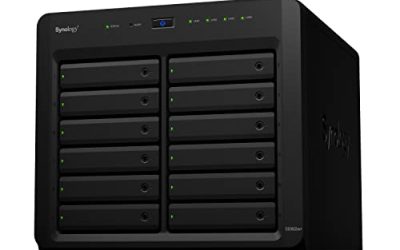
Synology DS1825+

The DS1825+ is the current-generation Synology pick for teams that want the mature DSM software, tidy user management and a volume that can outgrow the original chassis. Its 8GB of ECC memory and dual 2.5GbE ports suit a studio where a handful of editors open shared folders all day while snapshots and off-site backup run quietly behind them. Because it accepts expansion units up to 18 total bays, a team can start with four or five drives and keep one consistent archive instead of migrating to a bigger box later.
Specs
- Drive bays: 8 x 3.5-inch / 2.5-inch SATA, diskless
- CPU: AMD Ryzen V1500B quad-core, 2.2 GHz
- Memory: 8GB DDR4 ECC, expandable to 32GB
- Network: 2 x 2.5GbE RJ-45 ports
- Cache slots: 2 x M.2 2280 NVMe slots
- Expansion: up to 18 bays with two DX525 expansion units
- Operating system: Synology DSM
Best for: A small studio that wants one dependable archive the whole team shares daily.
Watch out for: Check Synology’s drive compatibility list for this model before ordering hard drives, since unlisted drives can trigger warnings.
ASIN: B0C8SBXSTJ
UGREEN NASync DXP8800 Plus

UGREEN’s flagship is the hardware maximalist of this group: a 10-core Intel processor, dual 10GbE networking and two Thunderbolt 4 ports on a diskless 8-bay chassis. That combination fits studios where the NAS doubles as a direct-attached ingest station, because a Thunderbolt cable can move a day’s camera cards far faster than a gigabit link. The built-in 128GB system SSD keeps the interface responsive, and the two M.2 slots leave room for an NVMe working volume beside the eight spinning bays.
Specs
- Drive bays: 8 x SATA, diskless
- CPU: Intel Core i5-1235U, 10 cores
- Memory: 8GB DDR5, expandable to 64GB
- System storage: built-in 128GB SSD
- Network: 2 x 10GbE ports
- Cache slots: 2 x M.2 NVMe slots
- Ports: 2 x Thunderbolt 4, 8K HDMI output
Best for: A video team that ingests large shoots and wants 10GbE without adding a network card.
Watch out for: Confirm your switch and cabling actually support 10GbE, otherwise this hardware advantage stays unused.
ASIN: B0D22HGH4N
QNAP TVS-h874-i5-32G

This is the muscle pick: a desktop Core i5 with 32GB of memory running QNAP’s ZFS-based QuTS hero system, aimed at teams that treat data integrity as a deliverable. Inline compression and deduplication stretch the eight bays further, and the PCIe Gen 4 slots leave a clear path to faster networking later. It suits a post-production group that also runs a render queue, a media server and client delivery folders from the same enclosure without wanting those jobs to fight over resources.
Specs
- Drive bays: 8 x 3.5-inch SATA 6Gb/s, hot-swappable, diskless
- CPU: Intel Core i5-12400, 6 cores / 12 threads, up to 4.4 GHz
- Memory: 32GB DDR4 SO-DIMM (2 x 16GB), expandable to 64GB
- Network: 2 x 2.5GbE ports
- Cache slots: 2 x M.2 2280 PCIe Gen 4 x4 slots
- Expansion: PCIe Gen 4 x16 slot and PCIe Gen 4 x4 slot
- Operating system: QuTS hero (ZFS-based)
- Power supply: 250W
Best for: A busy post-production team that wants ZFS protection and desktop-class processing in one box.
Watch out for: Verify the exact variant name on the listing, because the TVS-h874 family includes i5, i7 and Thunderbolt versions with different hardware.
ASIN: B0BGSZDWBZ
QNAP TS-873A-8G

The TS-873A takes a different route to longevity: a proven Ryzen embedded platform, two PCIe Gen 3 slots and a choice between QNAP’s standard QTS and the ZFS-based QuTS hero at setup. For a creative team, those slots are the story, since one can hold a 10GbE card when the studio rewires and the other can hold extra NVMe storage. With 8GB of memory installed and support for ECC modules, it balances archive duty today against a realistic upgrade path tomorrow.
Specs
- Drive bays: 8 x 3.5-inch / 2.5-inch SATA, diskless
- CPU: AMD Ryzen V1500B quad-core, 2.2 GHz
- Memory: 8GB DDR4, expandable to 64GB, ECC supported
- Network: 2 x 2.5GbE ports
- Cache slots: 2 x M.2 2280 NVMe slots
- Expansion: 2 x PCIe Gen 3 slots
- Operating system: QTS or QuTS hero
Best for: A growing agency that expects to add 10GbE or extra SSD storage by card next year.
Watch out for: The 10GbE card is a separate purchase, so confirm card compatibility with this model before planning the upgrade.
ASIN: B0GN4WFV67
Synology DS1821+

The DS1821+ remains the value entry into Synology’s 8-bay line, trading the newer model’s 2.5GbE ports for four gigabit ports that can be aggregated and a PCIe slot for a future network card. Its 4GB of ECC memory handles shared folders, snapshots and backup jobs for a small team without fuss, and DSM’s permission tools make client-by-client folder separation straightforward. For a photo or design studio whose bottleneck is organization rather than raw throughput, it delivers the same software experience as its newer sibling.
Specs
- Drive bays: 8 x 3.5-inch / 2.5-inch SATA, diskless
- CPU: AMD Ryzen V1500B quad-core, 2.2 GHz
- Memory: 4GB DDR4 ECC, expandable to 32GB
- Network: 4 x 1GbE RJ-45 ports
- Cache slots: 2 x M.2 2280 NVMe slots
- Expansion: 1 x PCIe Gen 3 x8 slot; up to 18 bays with two DX517 units
- Operating system: Synology DSM
Best for: A small design or photo team that values DSM’s management tools over headline network speed.
Watch out for: Single-editor transfers are capped by gigabit networking unless you aggregate ports or add a faster card, so check your switch supports aggregation.
ASIN: B08PKLKKVZ
Which One Fits Your Situation
Your Team Edits Video From the Server Every Day
Pick the UGREEN NASync DXP8800 Plus. Dual 10GbE is already installed, the 10-core processor keeps ingest and indexing from colliding, and the Thunderbolt 4 ports give an editor a fast wired option when the network is crowded. Among these five, it is the only one that removes the network card question entirely.
Your Studio Archives Client Work for Years
Choose the Synology DS1825+. DSM’s snapshot scheduling and shared-folder controls make long-term client archives easy to govern, ECC memory guards the data you cannot reshoot, and expansion units let the same volume grow to 18 bays instead of forcing a migration when the first eight fill up.
Your Agency Mixes Mac and Windows Workstations
The QNAP TVS-h874-i5-32G handles mixed shops well. Its desktop-class processor and 32GB of memory keep simultaneous SMB access smooth for both platforms, QuTS hero adds compression that stretches capacity for bulky design files, and the HDMI output simplifies setting up a local status display in the studio.
Your Team Is Replacing a Smaller NAS on a Budget
Start with the Synology DS1821+ if the existing drives and workflow are modest, since it brings the same DSM environment for less hardware outlay. If your roadmap already includes a 10GbE switch, the QNAP TS-873A-8G is the smarter budget move because its open PCIe slots accept the faster card later.
Common Mistakes
- Budgeting for the enclosure and forgetting that all five models here are diskless, so eight NAS-rated drives are a separate and larger purchase.
- Filling every bay on day one with a single RAID group, leaving no empty bay for a quick capacity swap when a project lands.
- Buying a 10GbE NAS while the studio switch and cabling still run gigabit, which quietly caps every transfer at the old speed.
- Skipping a UPS for a shared archive, even though a sudden power loss during a write is exactly when a team volume is most exposed.
- Treating RAID as a backup and keeping no second copy of client work off the NAS or off site.
Frequently Asked Questions
Do any of these enclosures include hard drives?
No. All five models in this guide are sold diskless, which the product titles state directly. You choose the drive capacity and RAID layout yourself, so plan the drive purchase alongside the enclosure and confirm each drive model appears on the maker’s compatibility list before ordering a full set of eight.
Can several editors really work from one 8-bay NAS at once?
Yes, provided the network keeps up. Multiple editors can open shared folders simultaneously on any of these models, but smooth multi-user editing depends on link speed: dual 2.5GbE covers a small team, while the UGREEN’s built-in 10GbE or a card upgrade on the QNAP models gives larger groups more headroom.
Which RAID level should a creative team choose?
RAID 6 is the common choice for an 8-bay creative archive because it survives two drive failures while keeping most of the capacity usable, which matters during a rebuild. RAID 5 risks the volume if a second drive fails mid-rebuild, and RAID 10 trades half the capacity for speed that archive work rarely needs.
Will these NAS models work with both Mac and Windows computers?
Yes. Synology DSM and QNAP’s systems both serve files over SMB, which macOS and Windows use natively, so a mixed studio can share the same folders and permissions. The UGREEN also adds Thunderbolt 4 ports, which suit direct connections from a Mac or Windows workstation for fast ingest.
More from Amazon
Programs that pair well with the guide above. Offers and eligibility are set by Amazon and may change.
Set up recurring deliveries of everyday items on eligible products. Terms and savings are set by Amazon.
Explore Subscribe & SaveCollect the home and kitchen items you want in one registry that guests can shop from.
Create a wedding registryFree shipping on eligible items, Prime Video and more. Eligible new members can start with a free trial.
Start a Prime free trialAudiobooks and podcasts to listen to on the go. Eligible new members can start with a free trial.
Try Audible freeAs an Amazon Associate we earn from qualifying purchases.




Write Your Review
No reviews yet. Be the first to share your experience!