

Key takeaways
- Four compact mini workstation computers for photo, video and design work, compared on processor power, 32GB memory, fast storage and multi-display support.
A creative desk rarely has room to spare, yet photo libraries, video timelines and layered design files keep growing. That tension is the real decision behind a mini workstation computer: how much processing power, memory and display support can fit into a box that sits quietly beside a monitor, without forcing a move to a full-size tower. The wrong choice shows up slowly, as exports drag, brushes lag and a second monitor stays dark because the ports are not there.
This guide is for photographers sorting large raw files, video editors cutting high-resolution timelines, graphic designers working with layered artwork, and illustrators who want a tidy desk that still handles demanding apps. The four picks below were chosen from Amazon product titles and specifications, with a focus on strong multi-core processors, generous memory, fast storage and the display outputs creative work depends on.
Quick Picks
As an Amazon Associate we earn from qualifying purchases.
| Product | Best for | Key spec from title |
|---|---|---|
| MINISFORUM UM890 Pro | Four-display photo and design setups | AMD Ryzen 9 8945HS, 32GB DDR5 RAM, 1TB PCIe 4.0 SSD |
| MINISFORUM UM790 Pro | Demanding video timelines in a tiny chassis | AMD Ryzen 9 7940HS, 32GB DDR5, 1TB SSD, Radeon 780M |
| Beelink SER8 | Quiet editing with fast DDR5 memory | AMD Ryzen 7 8745HS, 32GB DDR5 RAM, 1TB SSD |
| Beelink SER5 Pro | Everyday creative work on a smaller setup | AMD Ryzen 7 5825U, 32GB DDR4 RAM, 500GB SSD |
How to Choose
Processor and Graphics for Creative Apps
Photo editing, video encoding and design software all lean on the processor, and the difference between a modest chip and a strong one is felt in export times and timeline smoothness. Look for eight cores and sixteen threads as a starting point for serious creative work, with a boost clock near 5 GHz on the strongest models here. Integrated Radeon 780M graphics handle photo editing, illustration and lighter video work well, so a separate graphics card is not always required. Check the exact processor in the listing title, because mini PCs with similar names can carry very different chips, and the chip decides how the machine behaves under a heavy edit.
Memory for Large Files and Many Layers
Memory is where creative workflows either flow or stall, since raw photos, video previews and layered design files all compete for the same space. Thirty-two gigabytes is a sensible baseline for the work in this guide, giving photo editors and designers room to keep several apps open beside a browser full of reference material. Just as important is whether the memory can grow later, because a machine with two memory slots and room to expand stays useful as file sizes climb. Note whether the listing states DDR4 or DDR5 memory, and confirm the installed amount in the title rather than assuming every configuration of a model ships the same way.
Storage Speed and Room to Grow
Fast storage changes how a creative day feels, from launching apps to scrubbing through footage and saving large layered files. A PCIe 4.0 NVMe solid-state drive moves data noticeably faster than older storage, and one terabyte gives a working library room to breathe before archiving becomes urgent. Two drive slots are worth seeking out, since they let a second drive hold a photo catalogue or video cache while the first drive keeps the system and apps. Check the listed drive size and interface in the product details, and plan an external drive or a second internal drive before the main drive fills up.
Displays, Ports and Desk Footprint
Creative work spreads across screens, so display support deserves the same attention as the processor. A machine that drives three or four displays lets an editor keep a timeline on one screen, a preview on another and reference material on a third, which is hard to give up once it becomes habit. Look for a mix of HDMI, DisplayPort and USB4 outputs, and check the listed resolutions, since some ports support higher refresh rates than others. Count the USB ports for drives, tablets and card readers too, and measure the desk space, because even a compact box needs airflow around it and a clear path for cables.
The 4 Best Options
MINISFORUM UM890 Pro
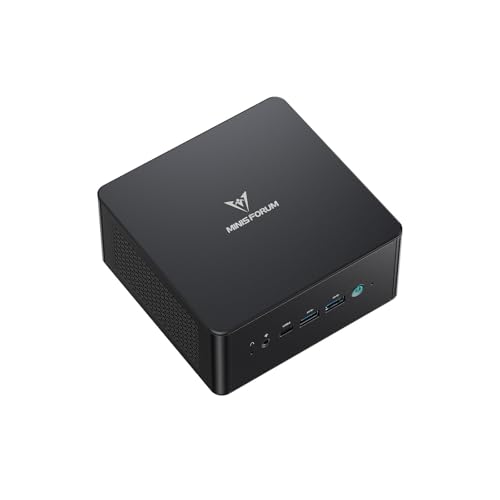
The UM890 Pro is the strongest all-round pick in this guide, and it suits a photographer or designer who wants one small machine to run a full multi-display setup without compromise. Its Ryzen 9 processor and Radeon 780M graphics handle layered photo edits, large design files and video timelines with headroom to spare, while four display outputs let a preview, a timeline and reference material each have a screen. Dual fast network ports and generous expansion also make it a solid choice for a home studio that shares files across a local network and expects the machine to stay in service for years.
Specs
- Processor: AMD Ryzen 9 8945HS, 8 cores and 16 threads, up to 5.2 GHz
- Graphics: AMD Radeon 780M, up to 2800 MHz
- Memory: 32GB DDR5 RAM at 5600MHz, expandable to 96GB
- Storage: 1TB PCIe 4.0 SSD, two M.2 2280 slots, expandable to 8TB
- Displays: HDMI 2.1, DisplayPort 1.4 and 2 USB4 ports, quad display, up to 8K at 60Hz and 4K at 144Hz
- Connectivity: Dual LAN 2.5G, Wi-Fi 6E, Bluetooth 5.2, 4 USB 3.2 ports, OCuLink port
- Brand and series: MINISFORUM, UM890 Pro
Best for: Photographers and designers running four displays with large files open at once.
Watch out for: Confirm the exact configuration in the listing before ordering, since this model is sold in more than one memory and storage combination.
MINISFORUM UM790 Pro

The UM790 Pro is the pick for video editors and photographers who want flagship-level processing in the smallest possible footprint. Its Ryzen 9 chip and Radeon 780M graphics keep high-resolution timelines responsive, and the combination of HDMI 2.1 and USB4 outputs supports the multi-monitor layouts that editing demands. With 32GB of DDR5 memory and a terabyte of fast storage, it handles large projects without constant shuffling of files, and its compact chassis frees desk space for a drawing tablet, a control surface or a second monitor that a tower would have crowded out.
Specs
- Processor: AMD Ryzen 9 7940HS, up to 5.2 GHz
- Graphics: AMD Radeon 780M
- Memory: 32GB DDR5 RAM
- Storage: 1TB SSD, two PCIe 4.0 slots
- Displays: 2 HDMI 2.1 ports and 2 USB4 ports
- Connectivity: 4 USB 3.2 ports, RJ45 2.5G, Wi-Fi 6E, Bluetooth 5.3
- Brand and series: MINISFORUM, UM790 Pro
Best for: Video editors who need strong processing and several display outputs in a tiny box.
Watch out for: Check whether the configuration you choose includes memory and storage, since a barebone version of this model is also listed without them.
Beelink SER8

The SER8 suits creators who want a quiet desk and fast memory without stepping up to the most powerful chip in this guide. Its Ryzen 7 processor pairs with 32GB of DDR5 memory and a PCIe 4.0 drive, a combination that keeps photo editing, illustration and lighter video work moving smoothly while several apps stay open. Triple display support covers the usual creative layout of canvas, tools and reference material, and the airflow design keeps fan noise low during long editing sessions. It is a balanced middle ground: clearly stronger than an entry-level mini PC, yet simpler to place and live with than a flagship.
Specs
- Processor: AMD Ryzen 7 8745HS, 8 cores and 16 threads, base 3.8 GHz, up to 4.9 GHz
- Graphics: AMD Radeon 780M, 12 cores at 2600 MHz
- Memory: 32GB DDR5 RAM, upgradeable to 256GB
- Storage: 1TB M.2 2280 NVMe SSD, PCIe Gen 4.0
- Displays: Triple display, 4K at 120Hz
- Connectivity: 2.5Gbps Ethernet LAN, Wi-Fi 6, Bluetooth 5.2, USB4, 2 USB 3.2 ports at 10Gbps
- Cooling: MSC 2.0 airflow design, 65W TDP, near-silent operation
Best for: Designers and photo editors who want quiet operation and fast DDR5 memory.
Watch out for: The memory is listed as upgradeable to a very large maximum, so confirm the installed 32GB configuration in the title rather than the maximum supported amount.
Beelink SER5 Pro

The SER5 Pro is the sensible starting point for everyday creative work, covering photo edits, layout, illustration and light video without the cost or complexity of a flagship chip. Its Ryzen 7 processor and 32GB of DDR4 memory handle layered files and multitasking well, and triple display support means a second or third monitor is already an option rather than a future upgrade. The 500GB drive suits a focused working library, with room to add storage as projects grow. For a creator setting up a first dedicated desk, or adding a second workstation to a small studio, it covers the essentials cleanly.
Specs
- Processor: AMD Ryzen 7 5825U, 8 cores and 16 threads, up to 4.5 GHz
- Graphics: AMD Radeon Graphics, 8 cores at 2000 MHz
- Memory: 32GB DDR4 RAM at 3200 MHz, expandable to 64GB
- Storage: 500GB M.2 2280 NVMe PCIe 3.0 SSD, expandable to 2TB
- Displays: Triple display, 4K at 60Hz, HDMI, DisplayPort and Type-C
- Connectivity: Wi-Fi 6, Bluetooth 5.2, 1000Mbps LAN
- Operating system: Windows 11 Pro
Best for: Creators starting out with photo, layout and illustration work on a smaller setup.
Watch out for: The 500GB drive fills quickly with video projects, so plan external storage or a larger drive before starting a long shoot.
Which One Fits Your Situation
A Photographer With Large Raw Libraries
Choose the MINISFORUM UM890 Pro when raw files, catalogues and layered edits all compete for attention. Its 32GB of DDR5 memory expands to 96GB, its two drive slots leave room for a dedicated photo drive, and four display outputs keep a catalogue, an editing canvas and reference images visible at once. The dual fast network ports also help when a library lives on shared studio storage rather than a single local drive.
A Video Editor Cutting High-Resolution Timelines
Choose the MINISFORUM UM790 Pro when timeline smoothness matters most and desk space is tight. Its Ryzen 9 processor and Radeon 780M graphics keep high-resolution footage responsive, while HDMI 2.1 and USB4 outputs support the multi-monitor editing layout that makes trimming and colour work faster. A terabyte of fast storage holds an active project comfortably, and the small chassis leaves room for the tablet or control surface beside it.
A Designer Who Wants a Quiet Desk
Choose the Beelink SER8 when the working day is long and fan noise becomes a distraction. Its airflow design keeps the machine near-silent under load, and 32GB of fast DDR5 memory keeps illustration and layout apps responsive with reference material open alongside. Triple display support covers the usual canvas, tools and reference layout, and the 1TB PCIe 4.0 drive gives a working library room to grow.
A Creator Setting Up a First Workstation
Choose the Beelink SER5 Pro when the goal is a capable first machine rather than a flagship. Its Ryzen 7 processor and 32GB of memory cover photo editing, layout and illustration well, triple display support leaves room to add monitors later, and the compact size fits a small desk or a shared studio corner. Keep an external drive nearby for archiving, since the 500GB internal drive is best treated as working space.
Common Mistakes
- Choosing by the model name alone, when the same mini PC name can hide several different processors and memory amounts.
- Buying a barebone configuration by accident and discovering that memory, storage or an operating system still needs to be added.
- Settling for too little memory, then watching layered files and video previews slow down as projects grow.
- Ignoring display outputs and discovering too late that a second or third monitor has nowhere to connect.
- Filling the only drive with finished projects instead of keeping working space free and archiving completed work elsewhere.
Frequently Asked Questions
Can a mini PC handle 4K video editing?
Yes, within limits, and the models in this guide are built for exactly that kind of work. A Ryzen 9 machine with 32GB of memory and a fast solid-state drive keeps high-resolution timelines responsive for typical editing, trimming and colour work. Long projects and heavy effects stacks still benefit from proxies and an organised media workflow, so plan the edit around the machine rather than expecting unlimited headroom.
How much memory do creative workflows need?
Thirty-two gigabytes is a good baseline for the photo, video and design work covered here, giving layered files, previews and several open apps room to run together. Sixteen gigabytes can work for lighter photo and layout tasks, but it leaves little margin once a browser, a catalogue and an editor are open at once. Choosing a model with room to expand protects the purchase as file sizes climb.
Do I need a separate graphics card for design work?
Not necessarily, since the Radeon 780M graphics in three of the picks here handle photo editing, illustration, layout and lighter video work well. A separate graphics card becomes more important for heavy three-dimensional rendering, complex motion graphics and demanding effects work. For most photo and design workflows, a strong processor, generous memory and fast storage matter more than a discrete card.
Can I add more storage or memory later?
It depends on the model, so check the listing before buying. The UM890 Pro lists memory expansion to 96GB and two drive slots, the SER8 lists memory expansion to 256GB, and the SER5 Pro lists memory expansion to 64GB with storage expansion to 2TB. Confirm whether the memory is socketed or soldered in your configuration, and back up important work before opening the case or adding a drive.
More from Amazon
Programs that pair well with the guide above. Offers and eligibility are set by Amazon and may change.
Set up recurring deliveries of everyday items on eligible products. Terms and savings are set by Amazon.
Explore Subscribe & SaveCollect the home and kitchen items you want in one registry that guests can shop from.
Create a wedding registryFree shipping on eligible items, Prime Video and more. Eligible new members can start with a free trial.
Start a Prime free trialAudiobooks and podcasts to listen to on the go. Eligible new members can start with a free trial.
Try Audible freeAs an Amazon Associate we earn from qualifying purchases.

Write Your Review
No reviews yet. Be the first to share your experience!