

Key takeaways
- Two to five bands: best for broad bass, midrange, and treble changes or a few targeted adjustments.
- Six to ten bands: a practical range for everyday stereo listening and moderate speaker matching.
- 15 bands: useful when you want more control without the visual density of a professional unit.
- 31 bands: suitable for detailed system equalization, installed audio, or users comfortable making narrow adjustments.
- Parametric filters: often more effective than a high band count because each filter can be placed exactly where needed.
The best equalizers depend on your system: choose a graphic equalizer for quick, intuitive tonal changes, a parametric equalizer for precise correction, or a room-correction processor when speaker placement and room acoustics are the main problem.
Our top picks


As an Amazon Associate we earn from qualifying purchases at no extra cost to you. Ratings are shown as listed on Amazon.
Best equalizers by listening situation
| Situation | Best fit | Why it makes sense | Important limitation |
|---|---|---|---|
| Simple stereo system and occasional tone shaping | Schiit Loki Mini+ | Four large analog controls, RCA connectivity, and very simple operation | Only four fixed frequency areas; no digital room correction |
| Detailed digital tuning with headphones or active speakers | RME ADI-2 DAC FS | Five-band parametric EQ, six-band graphic EQ, headphone outputs, and extensive digital control | More complex and more expensive than a basic tone control |
| Two-channel system needing room correction | miniDSP Flex | DSP filtering, multiple input/output choices, parametric control, and Dirac Live compatibility on suitable versions | Requires software setup and careful microphone measurements |
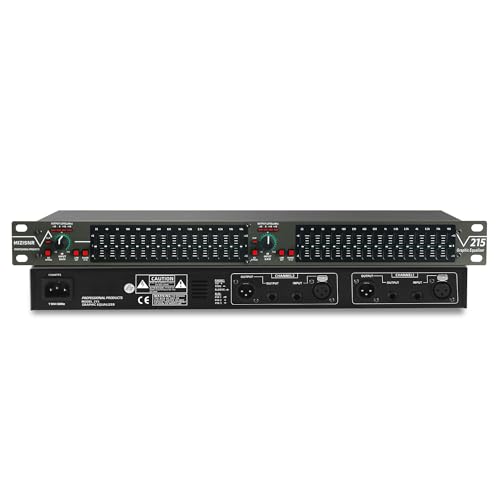
| Rack-mounted analog installation | dbx 1231 | 31 bands per channel, balanced connections, and familiar front-panel sliders | Large, professional-style unit with no automatic correction |
| Computer-based listening | Software parametric EQ | Very flexible, inexpensive, and easy to save different profiles | Works only while the audio device and software remain in the signal path |
Graphic versus parametric equalizers
A graphic equalizer gives each band a dedicated slider or knob. The control positions form a visual curve, making it easy to raise bass, soften treble, or reduce a harsh region. Common layouts include five, seven, ten, 15, and 31 bands per channel. A 31-band design typically spaces controls one-third of an octave apart, which is useful for live sound and detailed system tuning but can be excessive for casual home listening.
A parametric equalizer lets you choose a filter’s frequency, level, and bandwidth, usually expressed as Q. This is more precise. For example, you might cut 4.2 kHz by 2 dB with a Q of 1.4 instead of affecting a broad, fixed midrange slider. Parametric controls are usually the better choice for correcting a measured peak, matching speakers to a room, or creating several carefully tailored listening presets.
The trade-off is usability. Graphic EQ is faster to understand, while parametric EQ rewards measurement and patience. If you do not know the frequency of a problem, a graphic unit can encourage broad boosts that make the system louder but not more accurate. If you do know the problem frequency, parametric control normally uses fewer filters and creates less unwanted change elsewhere.
Connection types determine where the equalizer can go
RCA line-level connections
RCA is the most convenient option for a typical integrated amplifier, preamplifier, streamer, or CD player. An analog equalizer must be inserted at line level, ideally through a tape monitor loop, processor loop, or between a source and preamplifier. Connecting it between an amplifier and passive speakers is unsafe unless the unit is specifically designed for speaker-level signals.
Balanced XLR and TRS connections
Balanced connections are preferable for long cable runs, studio equipment, and systems vulnerable to hum. The dbx 1231, for example, is intended for professional rack systems and uses balanced input and output connections. Balanced wiring does not automatically improve sound quality, but it can reduce noise caused by cable routing and ground differences.
USB, optical, coaxial, and network audio
Digital equalizers can avoid an extra analog conversion when they sit between a digital source and a DAC. USB is useful with a computer; optical and coaxial inputs work with many televisions, streamers, and disc players. A DSP processor such as the miniDSP Flex can be more versatile than a traditional analog equalizer because it can handle digital inputs, analog inputs, output routing, crossover filters, and multiple presets, depending on the configuration.
Check the signal path before buying. A digital equalizer cannot automatically process a source connected elsewhere, and an analog equalizer will not affect audio that bypasses it through a separate input. Home theater systems also require special care: inserting a stereo equalizer after a multichannel receiver may process only the front-channel signal rather than the entire system.
How many bands do you actually need?
- Two to five bands: best for broad bass, midrange, and treble changes or a few targeted adjustments.
- Six to ten bands: a practical range for everyday stereo listening and moderate speaker matching.
- 15 bands: useful when you want more control without the visual density of a professional unit.
- 31 bands: suitable for detailed system equalization, installed audio, or users comfortable making narrow adjustments.
- Parametric filters: often more effective than a high band count because each filter can be placed exactly where needed.
More bands do not guarantee better sound. The quality of the measurements, the filter design, and the ability to bypass or compare settings matter more. A unit with four well-chosen parametric filters can solve a specific bass resonance more cleanly than a ten-band graphic equalizer with fixed frequencies.
Room correction is different from ordinary tone control
Ordinary equalization changes the signal according to settings you choose. Room-correction systems measure the speakers and listening area, then create filters intended to reduce uneven response. Dirac Live, available with selected hardware and software configurations, is one example of a room-correction platform that uses microphone measurements and can account for timing as well as frequency response.
Room correction is most valuable below roughly 300 Hz, where room dimensions create strong peaks and nulls. It cannot fully repair a deep null caused by cancellation; adding more amplifier power may simply waste energy. It also does not replace speaker positioning, bass trapping, or sensible listening-seat placement. A good processor should provide a bypass mode, target-curve controls, and enough memory for several presets.
For a living-room system, look for adjustable correction limits rather than forcing the software to equalize every visible wiggle. Very narrow high-frequency variations may come from microphone position or normal speaker directivity and do not always need correction.
Setup procedure that avoids common mistakes
- Place the equalizer in the correct signal path. Confirm whether you are processing a source, all stereo sources, a subwoofer feed, or only a pair of amplifier channels.
- Start with cuts, not boosts. A 3 dB cut to a peak usually preserves more headroom than a 3 dB boost elsewhere. Remember that a 3 dB boost requires approximately twice the amplifier power at that frequency.
- Use one change at a time. Record the frequency, gain, and Q for every adjustment so you can reverse it.
- Check level matching. A louder setting often sounds more exciting even when it is less accurate. Match bypass and equalized volume as closely as possible.
- Listen at several seats. A correction that improves one chair can make another worse, especially at bass frequencies.
- Save a neutral preset. Keep an untouched reference setting and create separate profiles for music, television, and low-volume listening.
As a practical example, assume a room measurement shows a broad 50 Hz peak of 5 dB. Instead of boosting every other frequency, apply a moderate cut near 50 Hz with a medium Q, then remeasure. If the peak remains, make a smaller second adjustment. Avoid trying to fill a deep null unless you have confirmed that it is not caused by speaker or seat placement.
Durability and ownership considerations
On analog graphic equalizers, sliders and rotary switches are the parts most likely to become noisy after years of dust exposure. Keep unused inputs covered, avoid spraying cleaner directly into the front panel, and use the manufacturer’s recommended contact-cleaning procedure if controls become intermittent. Mechanical sliders also need enough rack clearance for their travel and should not be blocked by a cabinet door.
Digital processors have fewer moving parts, but they depend on firmware, configuration software, and compatible computers. Save your presets to a file, retain the original calibration microphone data, and verify software support before changing operating systems. Room-correction microphones can drift or be damaged by moisture, so store them in a case and do not substitute an uncalibrated microphone when precision matters.
Also check bypass behavior and standby power. Some units remain in the signal path even when their front-panel effect is switched off, while others provide a true relay bypass. A true bypass is useful when diagnosing hum, comparing tonal changes, or troubleshooting a failing processor.
Final buying advice
Choose the best equalizers by matching control style to the problem. Buy a graphic unit such as the Schiit Loki Mini+ when you want immediate, broad tonal adjustment in a simple RCA stereo system. Choose a parametric device such as the RME ADI-2 DAC FS when precision, digital connectivity, and headphone features matter. Choose a DSP processor such as the miniDSP Flex when room acoustics, subwoofer integration, multiple inputs, or saved correction profiles are central to the system. For a professional rack with balanced cabling and many fixed bands, the dbx 1231 remains the more natural format.
Before purchasing, count the sources you need to connect, identify whether your amplifier accepts an external processor, decide whether you need room measurement, and reserve enough headroom for cuts and occasional boosts. Those checks matter more than choosing the equalizer with the highest band count.






Write Your Review
No reviews yet. Be the first to share your experience!